 Mergeline
See exactly who replied
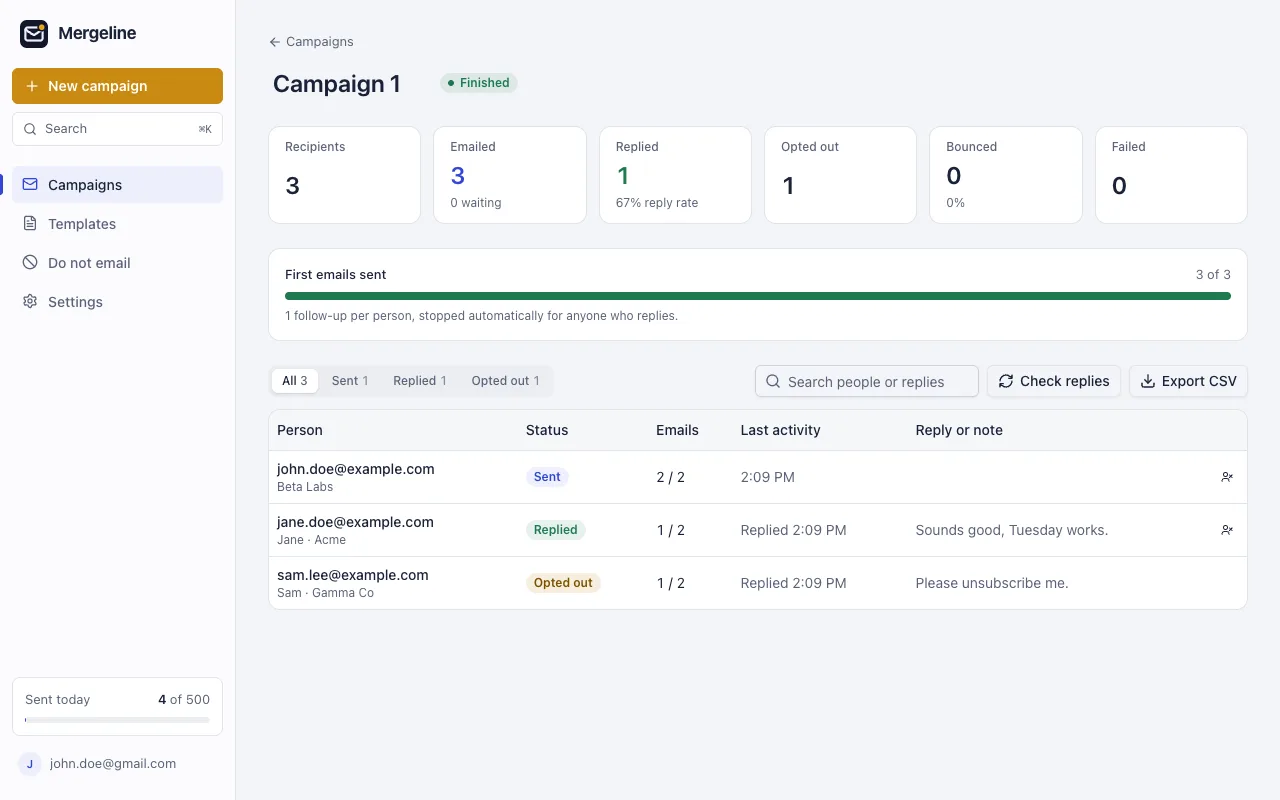
Mergeline finds replies, bounces and unsubscribes in your Gmail and shows them per person. Export everything to CSV.
Mail merge for Gmail. Free for 60 emails a day, with follow-ups that stop when people reply.
Bcc sends everyone the same “Hi all”. Mergeline sends each person their own email, with their name, their company and a thread of their own for follow-ups.
To: you@example.comBcc: 48 recipientsSubject: Quick ideaHi all,
To: jane.doe@example.comSubject: Quick idea for AcmeHi Jane,
All from a side panel in Chrome, in a few minutes.
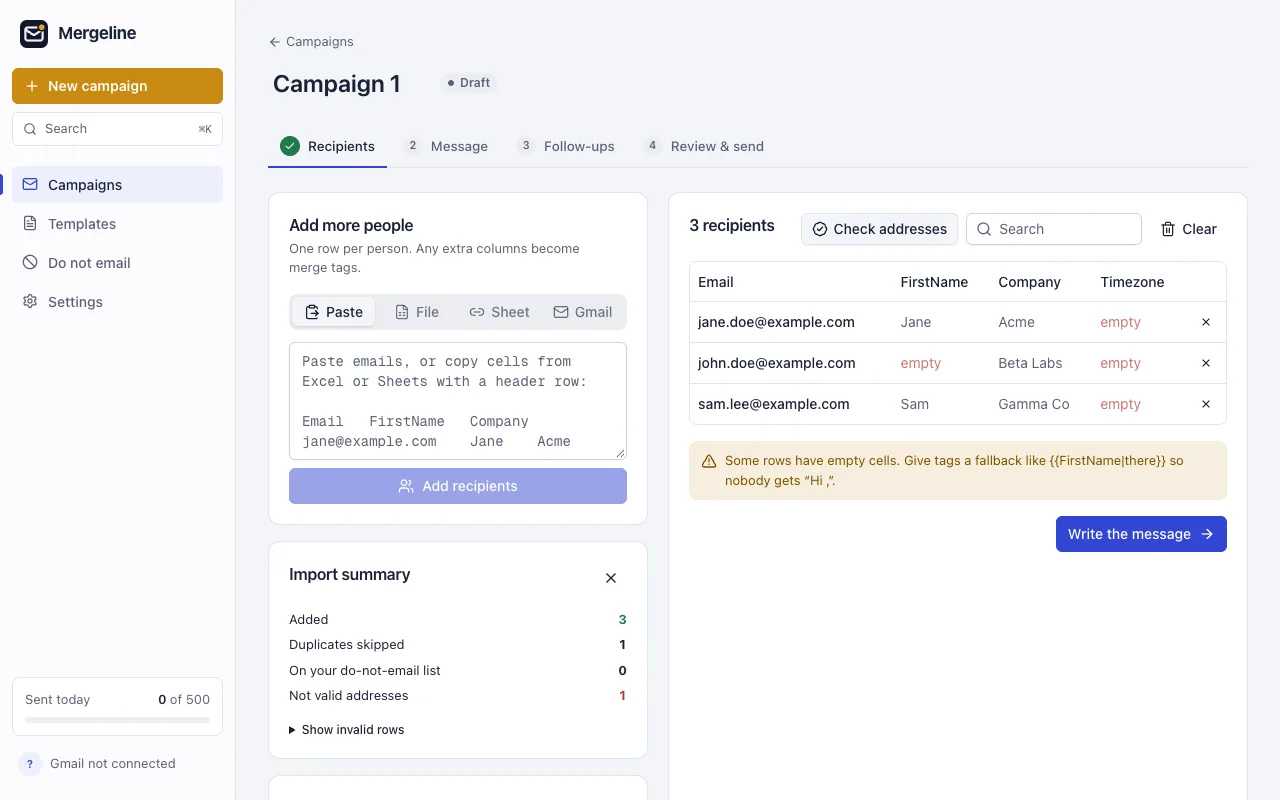
Paste addresses, drop a CSV or Excel file, link a Google Sheet, or collect people from a Gmail search. Duplicates and invalid addresses are removed for you.
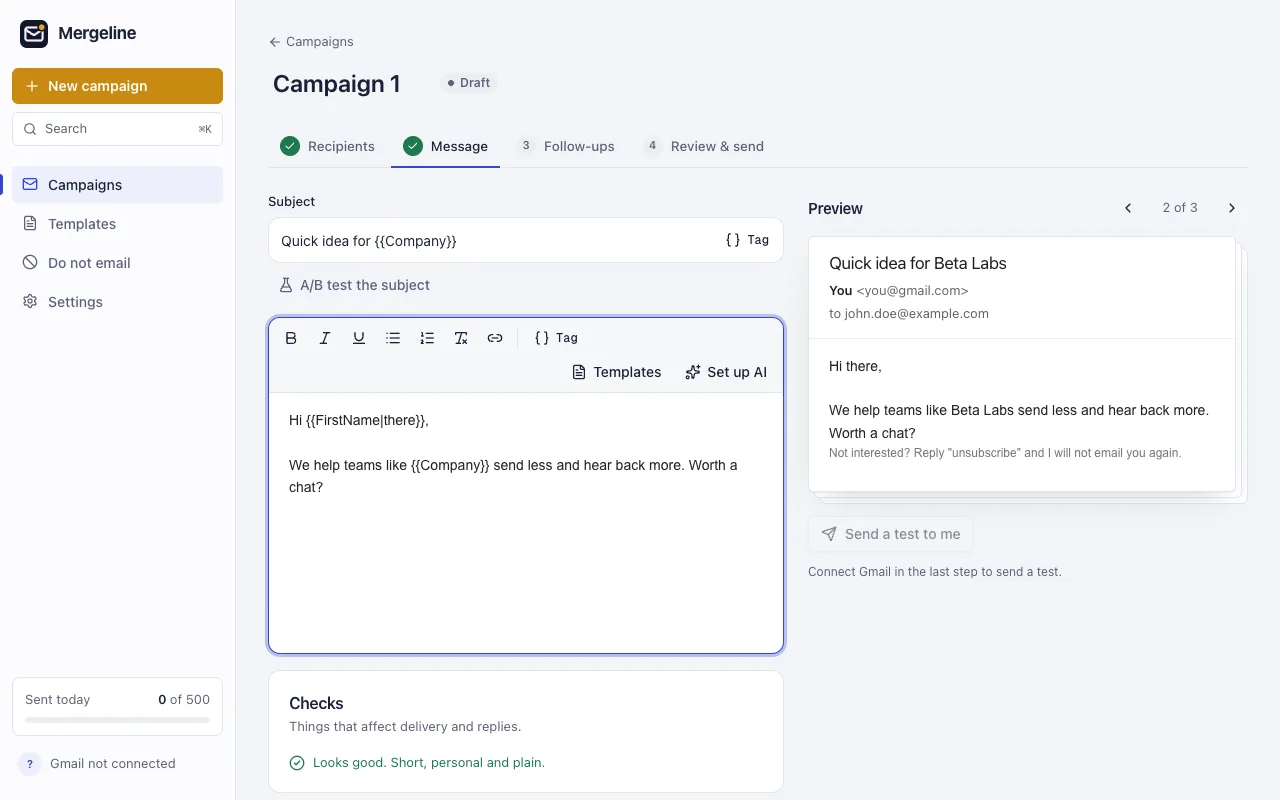
Use tags like {{FirstName|there}} with a fallback for empty cells, or start from a template. Preview the exact email each person gets.
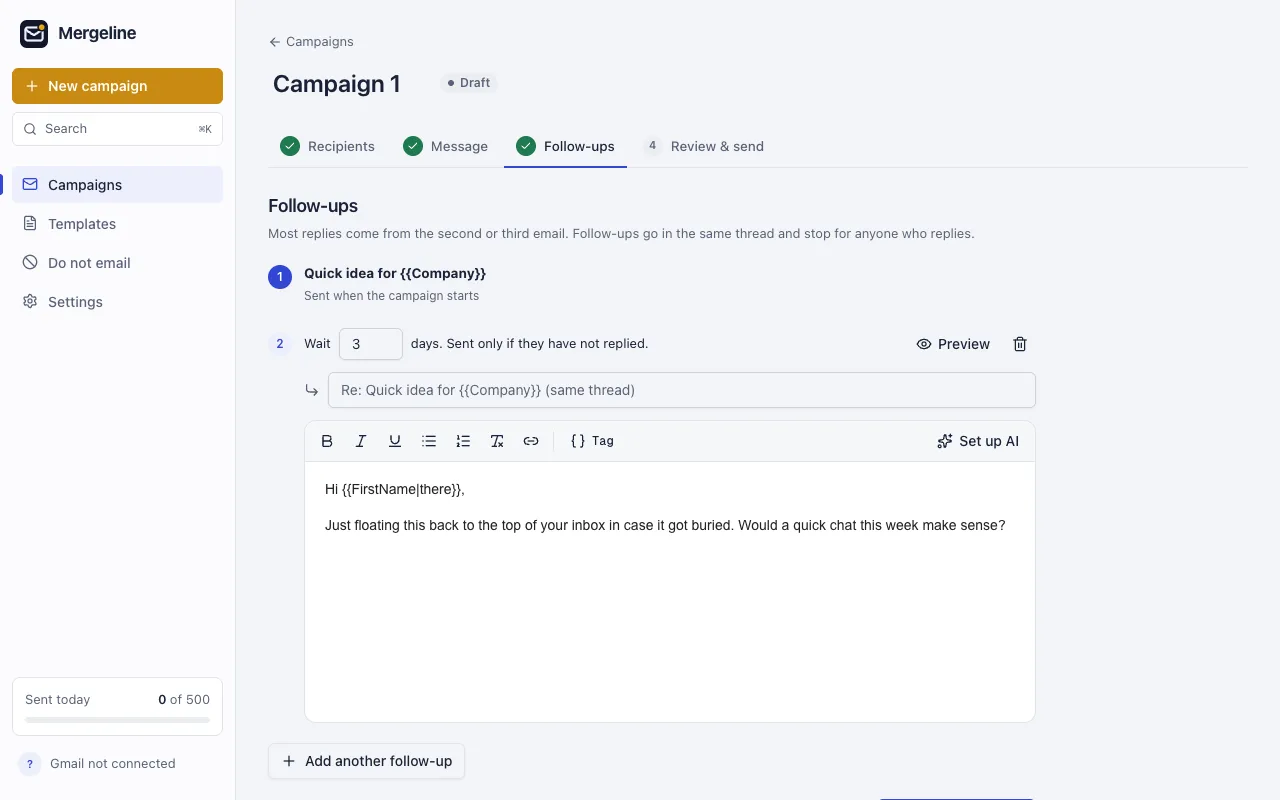
Up to 7 follow-ups in the same thread, each after the days you choose. They stop for anyone who replies.
Mergeline sends through your Gmail at a safe pace with a slow start, and every email shows up in your Sent folder.
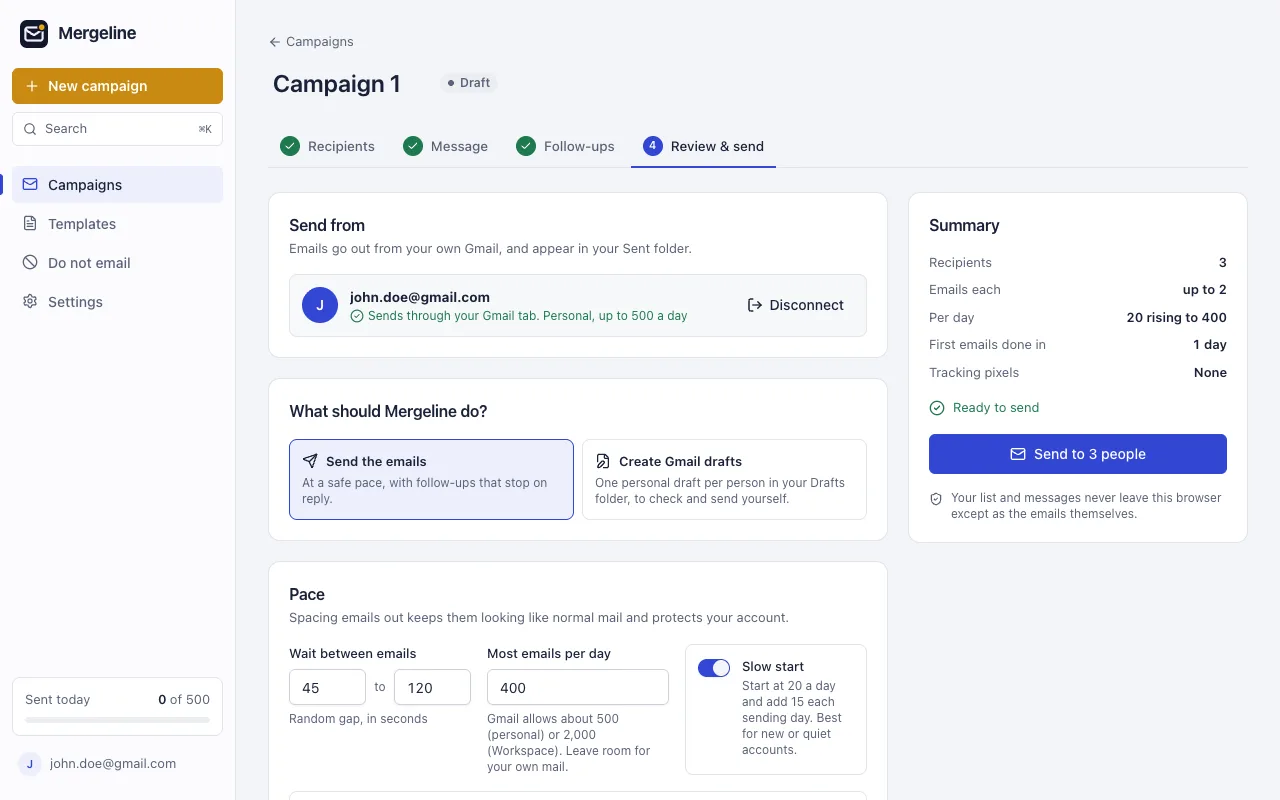
Everything a personal campaign needs, and nothing that makes it look like a mass mailing.
Mergeline finds replies, bounces and unsubscribes in your Gmail and shows them per person. Export everything to CSV.
Flip through the exact email each person will get before anything is sent.
Write to several people in Gmail, press the Mergeline button, and each gets their own copy.
New rows in a linked sheet get the email automatically.
Split your list between two subject lines and keep the one that earns more replies. Add Cc, Bcc and attachments, or create drafts to send yourself.
Write it once. Every person gets an email meant for them, sent from your own Gmail, and your list never leaves your browser.
Private by design
Mergeline runs in your browser and sends through your Gmail. No Mergeline server receives your lists, your messages or your replies, so there is nothing for us to store, leak or sell.
Mergeline servers are not in the path. If you buy Pro, they check your license key. That is all they ever see.
Read exactly what leaves your computer in the privacy policy and on the security page.
Emails per day for a new or quiet account, until it reaches the cap you set.
45 to 120 seconds between emails by default, never a burst.
Sudden bursts from a quiet account look like spam. Mergeline sends at a human pace by default and stops itself when something looks wrong.
The free plan never expires and adds no branding. Pro is for bigger lists and automatic follow-ups.
$0
Free forever, no card.
$12 /month$99 /year
Billed monthly. Cancel in one click.About $8.25 a month, billed yearly.
Prices in US dollars. Checkout by Paddle, our merchant of record, which adds sales tax where required. Your first payment is refundable for 14 days.
From each tool’s public website, checked October 2026. Plans and features change, so check their sites before you decide.
| Feature | Mergeline | GMass | YAMM | Mailmeteor |
|---|---|---|---|---|
| Where you use it | Gmail, as a Chrome extension | Gmail, as a Chrome extension | Google Sheets | Gmail, Sheets, Docs, Excel and a web dashboard |
| Free plan | 60 emails a day, no time limit | Free trial | 20 recipients a day | 50 emails a day |
| Open tracking pixels | None added | Offered | Offered | Offered |
Yes. The free plan sends up to 60 emails a day with merge tags, conditional text, 12 templates, reply and bounce detection and the address check. It adds no branding to your emails and needs no card.
Gmail allows about 500 emails a day from a personal Gmail account and about 2,000 from Google Workspace. Mergeline Free sends up to 60 a day, and Pro sends up to Gmail’s own limit. Leave some room for the email you write by hand.
Write short, plain emails to people who expect to hear from you. Mergeline helps: it adds no tracking pixels or link redirects, sends at a human pace with a slow start for new accounts, and checks each email for missing tags, spam filter phrases and too many links before you send.
No. Your lists, messages and results are stored in your browser. Emails go from your browser straight to Gmail in your own account. Mergeline has no server that receives them. The only thing our server ever sees is your license key, if you buy Pro.
Bcc sends one identical email to everyone, usually starting with “Hi all”, and a slip into the To field shows every address. Mail merge sends each person a separate email with their own name and details, in their own thread, so you can follow up with each one.
Yes, with Pro. You can add attachments, Cc and Bcc to a campaign, or create personal drafts in Gmail to check and send yourself.
Yes. Paste a Google Sheets link and its rows become your list, with each column available as a merge tag. With Pro, new rows added to the linked sheet get the email automatically. You can also paste addresses, drop a CSV or Excel file, or collect people from a Gmail search.
With Pro you can add up to 7 follow-ups. Each one is sent in the same conversation after the number of days you choose, and stops automatically for anyone who replies.
Each person gets their own normal email, addressed only to them. There is no Bcc, nobody sees the other addresses, and every email shows up in your Sent folder like one you typed yourself.
Yes, Mergeline sends from your browser, so a campaign runs while it is open. If you close it, sending picks up where it left off when you open it again.
Chrome, Edge and Brave, with a Gmail or Google Workspace account.
Yes. Cancel in one click from Manage subscription, and Pro keeps working until the end of the period you paid for. Your first payment is refundable for 14 days. See the refund policy.
Free for 60 emails a day. Install it, open Gmail, write once, and each person gets their own email.
Add to Chrome